Chrome Extension

Stop scrambling to mute tabs when a meeting starts.

MeetingFocus auto-mutes every other browser tab and silences notifications the moment you join a Google Meet, Zoom, or Microsoft Teams call. When the call ends, everything comes back on its own.
Free to install. Pro features one-time $9.99.
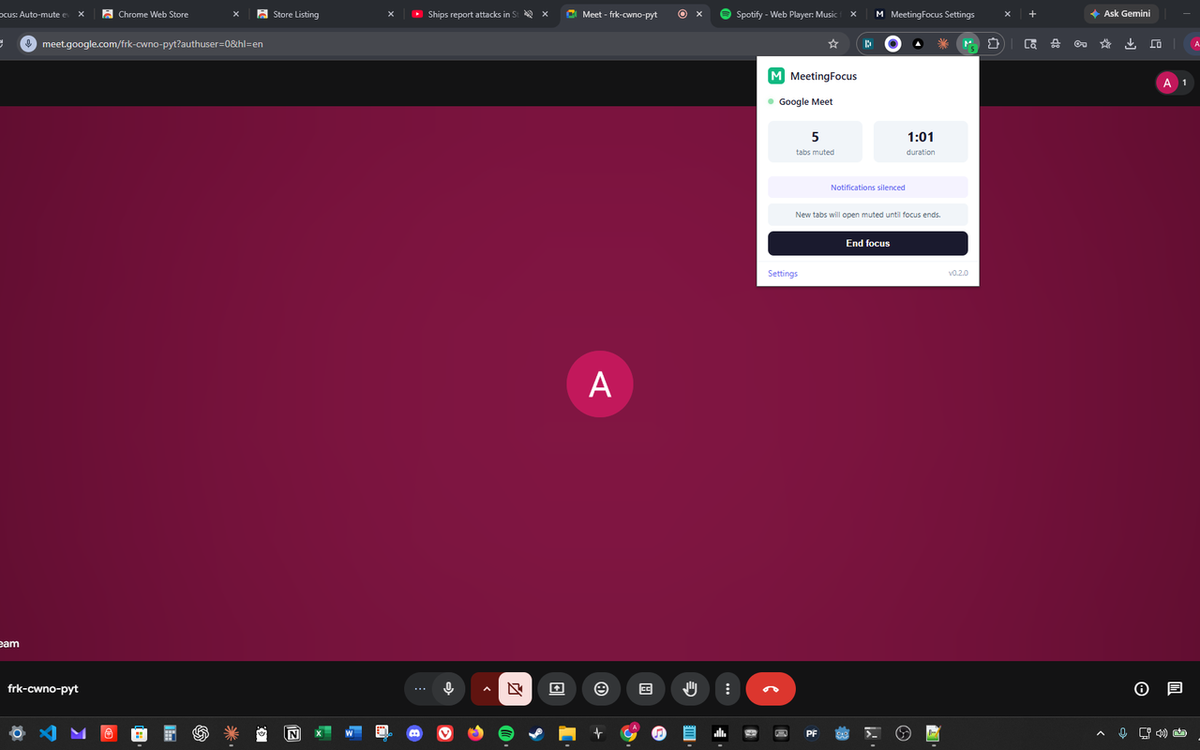
MeetingFocus popup showing five tabs muted and a one-minute duration timer during a live Google Meet call.

Works with

Google Meet Zoom Microsoft Teams

Features

Instant, automatic mute

The moment a Meet, Zoom, or Teams tab activates, every other tab gets muted. No clicks. No setup.

🔕

Silence notifications too

Pro blocks Slack, Discord, and Gmail alerts from popping up during your screen share. No more "anyone want tacos?" mid-presentation.

🎧

Allowlist what you love

Keep Spotify, YouTube Music, or any domain you want playing through your meetings. You stay in control.

🎛️

Meeting profiles

Standup keeps Slack audible. Presentation mutes everything. Create custom profiles for each type of call you take.

🔄

Restores when you're done

When the call ends, MeetingFocus puts every tab back to the exact mute state it was in before.

🛡️

Local. Private. Server-free.

Nothing leaves your device. No accounts, no tracking, no telemetry. Your meetings are your business.

Simple, one-time pricing

Start free. Upgrade once if you want the power features.

Free
$0
  • Auto-mute on Meet, Zoom, Teams
  • Allowlist up to 3 sites (Spotify, YouTube, etc.)
  • Session restore: reopen tabs closed mid-meeting
  • Meeting history log
  • Keyboard shortcut to toggle focus
Pro
$9.99 one-time
  • Everything in Free
  • Notification silencing: block Slack, Gmail, Discord alerts mid-call
  • Meeting profiles: named rulesets for standups, client calls, presentations
  • Unlimited allowlist domains

Frequently asked questions

Quick answers about how MeetingFocus works and what it does not do.

How does MeetingFocus auto-mute tabs when a Zoom or Google Meet call starts?
MeetingFocus watches for the tab patterns Google Meet, Zoom, and Microsoft Teams use when a call is active. The moment one of those tabs goes live, it mutes every other browser tab using Chrome's native tab-audio controls. When the meeting tab closes or leaves the call state, every muted tab is restored to exactly the state it was in before. No clicks, no setup.
Can it silence Slack, Gmail, and Discord notifications during a screen share?
Yes, with Pro. Pro blocks browser-level push notifications from Slack, Gmail, Discord, and any other site you have granted notifications to, for as long as a meeting is active. Nothing pops up mid-presentation. When the call ends, notifications are allowed again automatically.
Can I keep Spotify or YouTube Music playing through my meetings?
Yes. The allowlist lets you mark specific domains, like open.spotify.com, music.youtube.com, or any site you choose, as exempt from auto-mute. Those tabs keep playing while everything else is silenced. Free supports up to three allowlisted domains; Pro is unlimited.
Does it work with Microsoft Teams?
Yes. MeetingFocus detects Teams calls in Chrome, including teams.microsoft.com and teams.live.com. If you primarily use the Teams desktop app, MeetingFocus will still auto-mute all browser tabs the moment you join a call via the web client. Meet, Zoom web, and Teams web are all supported at parity.
Does MeetingFocus send my meeting data anywhere?
No. Everything runs on your device. There are no accounts, no server, no analytics, and no telemetry. Meeting history is stored locally in your browser and never leaves it. You can delete it at any time from the extension's settings page.
What are meeting profiles and when should I use them?
Meeting profiles are Pro-only named rulesets for different kinds of calls. A Standup profile might keep Slack audible because you actually want to hear pings. A Presentation profile mutes everything, blocks every notification, and keeps Spotify silent. A Client profile might allowlist only your CRM tab. You pick the profile when a call starts, or let MeetingFocus pick by domain rule.
Is the Pro upgrade really one-time? No subscription?
Correct. $9.99 once, lifetime Pro access on that browser account. No recurring charges, no renewals, no hidden trial conversions. If you uninstall and reinstall later, your Pro unlock restores from your email via ExtensionPay.
Does MeetingFocus work in Brave, Edge, or Arc?
Yes. Any Chromium-based browser that supports the Chrome Web Store can run MeetingFocus, including Microsoft Edge, Brave, Arc, and Vivaldi. Install it from the Chrome Web Store and it runs natively.